Recipe groups
A useful feature of DDC is that you can organize your recipes into recipe groups that correspond to the groups on the oven panel. After creating a recipe groups, you can send it to one or more ovens, and all the recipes in that group will be available on your ovens.
This feature is available for all oven lines except CHEFTOP-X™ Digital.ID™, BAKERTOP-X™ Digital.ID™ and SPEED-X™ Digital.ID™. For these ovens, recipes can be organized using GROUPS. More details are available in the dedicated section.
Create a recipe group
To create your first group, go to the Library DDC page, choose an oven type and then click on NEW to select New recipe group.
You will be shown a pop-up where you can input the name of your recipe group, the description and eventually an image. Then click "NEXT" and select the recipes that you want to add to this group. When you are done, click "CREATE" and your recipe group will be automatically added to your library.
A group of recipes on the oven can contain up to a maximum of 24 recipes, so if the total of the existing recipes plus the ones that you are sending is more than 24, the exceeding ones will be ignored.
Add recipes to an existing group
You can always add more recipes to your groups until you reach 24 recipes.
To do so, first open the recipe group, then click ADD RECIPE and select the recipes that you want to add among all the recipes that you created for this oven type. Then click ADD and your recipes will be immediately added.
If you prefer, you can enter the page of a specific recipe, click the button MORE, select Add to recipe group and then select the groups where you want to add the recipe (it can be added to more than one recipe group).
Change recipes order
To change your recipe order, go inside a recipe group and click the button MORE, then select Reorganize recipes. In this view, the recipes will have a drag element in the center, you can now order them as you prefer.
Once you have defined the order of the recipes you prefer, you can finally save the recipe group you created by clicking on DONE. Send the recipes to your ovens to have on the panel in the same order as the one you chose in the DDC recipe group.
Edit a recipe group
To edit the name and image of the recipe group, you can go inside it and click the button MORE. From the dropdown menu, select Edit: you can now change your recipe group name and edit the image. Save at the end of the process, and changes will be immediately saved.
Add recipes to a recipe group
You can add recipes to your recipe group: click ADD RECIPES on the top right of the page and select from the pop-up the recipes that you want to add. Click ADD and the recipe will be immediately added to your recipe group.
Important Notice: If you have already sent the recipe group to your ovens, please resend it to ensure the new recipe is included.
Recipe groups page
In the main library page, you can see just a few recipe groups, but when you have several of them, it is useful to have a dedicated page where you can see them all.
To do so, you can access the library that you want and then click the button SEE ALL on the top right of the recipe groups. This will open the recipe groups page.
Send a recipe group to your ovens
After creating the recipe group, you can send it to one or more of your ovens. In the same way as recipes, you will find the SEND TO OVENS button at the top right of the page.
Clicking it will open the oven selection window, where you can choose which ovens and oven groups you want to send the recipe group to. Then click SEND to confirm your choices and start to send the recipes.
In this view, you can also select if you want to overwrite the page in the group.
ATTENTION! If you decide to overwrite the page, ALL the recipes inside that page in ALL the selected ovens will be deleted.
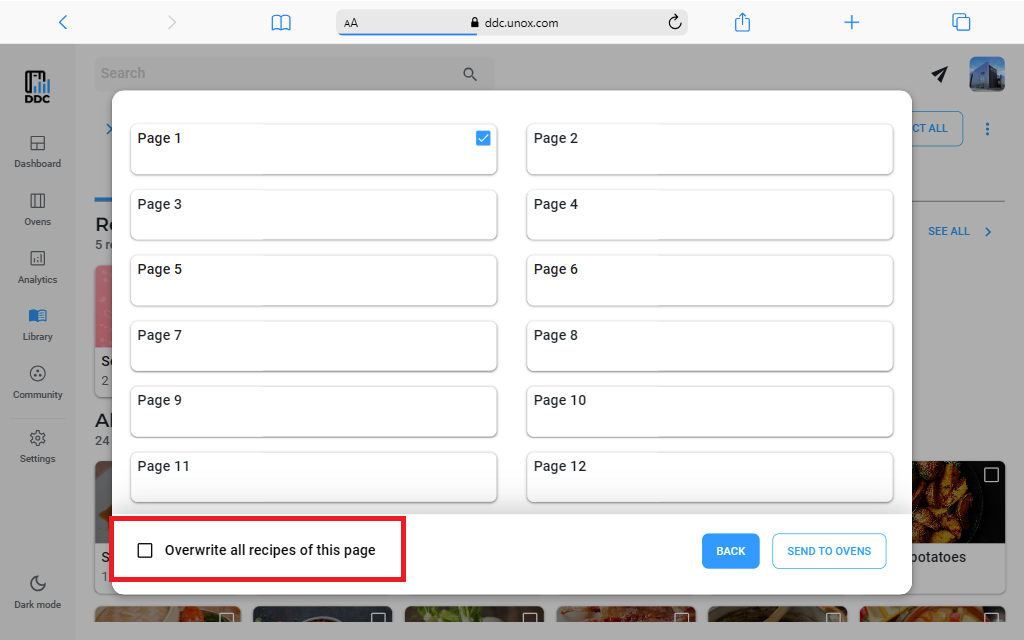
If the page that you selected already contains recipes, the new ones will be added after the existing ones.
Remember that a group of recipes on the oven can contain up to a maximum of 24 recipes, so if the total of the existing recipes plus the ones that you are sending is more than 24, the exceeding ones will be ignored.
If you have previously used your own picture as the recipe image instead of one of the default ones, sending the recipe to the oven may take up to a few minutes, depending on the size of the image you uploaded.
Remove recipes from recipe groups
If you want to remove a recipe from a recipe group without deleting it, you can go inside the recipe group and click the button MORE. Then click Select and select the recipes that you want to remove. Click the button MORE on the top right of the page and select Remove recipes from the menu.
Your recipes will no longer be inside the recipe group, but you can still see them inside your library.
If the recipe group has already been sent to your ovens and you remove one or more recipes from it, you need to send the group again to the ovens to align the device with the DDC.